
 By KUY.io • 4 minutes read
Table of Contents
We love Ruby on Rails - it's no secret. It’s the framework that lets us ship faster and live happier lives. But if we’re being honest, there is one part of the stack that hasn't quite kept up with the "modern front-end magic" we see elsewhere: the view layer.
Frameworks like React, Vue, and Svelte have moved toward declarative, component-based architectures, Rails developers have largely stuck with ERB. Don't get us wrong: ERB is battle-tested. It's fast. It's rendered trillions of lines of HTML over the past decade. But in a world of ViewComponents and complex UI interactions, the markup can feel a bit heavy and working with ViewComponents - especially when they make use of slots - becomes tedious very quickly.
That’s why we created ORB Template. It brings the declarative power and developer experience (DX) of JSX/Vue directly into Ruby, without the heavy JavaScript build pipeline.
If you’ve read the README, you know the basics. But today, we want to dive into the "hidden gems"- the workflow improvements that make ORB not just a syntax change, but a productivity boost for your entire team.
HTML-Native View Components
We’ve all been there: you’re refactoring a complex ERB partial, you hit "Format Document" in VS Code, and suddenly your indentation is broken because the formatter doesn't understand that a Ruby block started inside a <div> and ended three levels deeper.
Because ERB is fundamentally "text with holes in it," HTML-facing tools often struggle to parse it. Also many of the nice creature comforts editors provide for HTML or JSX are often not available when working with ERB view templates.
ORB changes the game by making view components first-class citizen and allowing you to render them with HTML syntax. Beyond that, ORB extends the default HTML language with directives for control flow and loops. These are special attributes you add to your tags to give them superpowers.
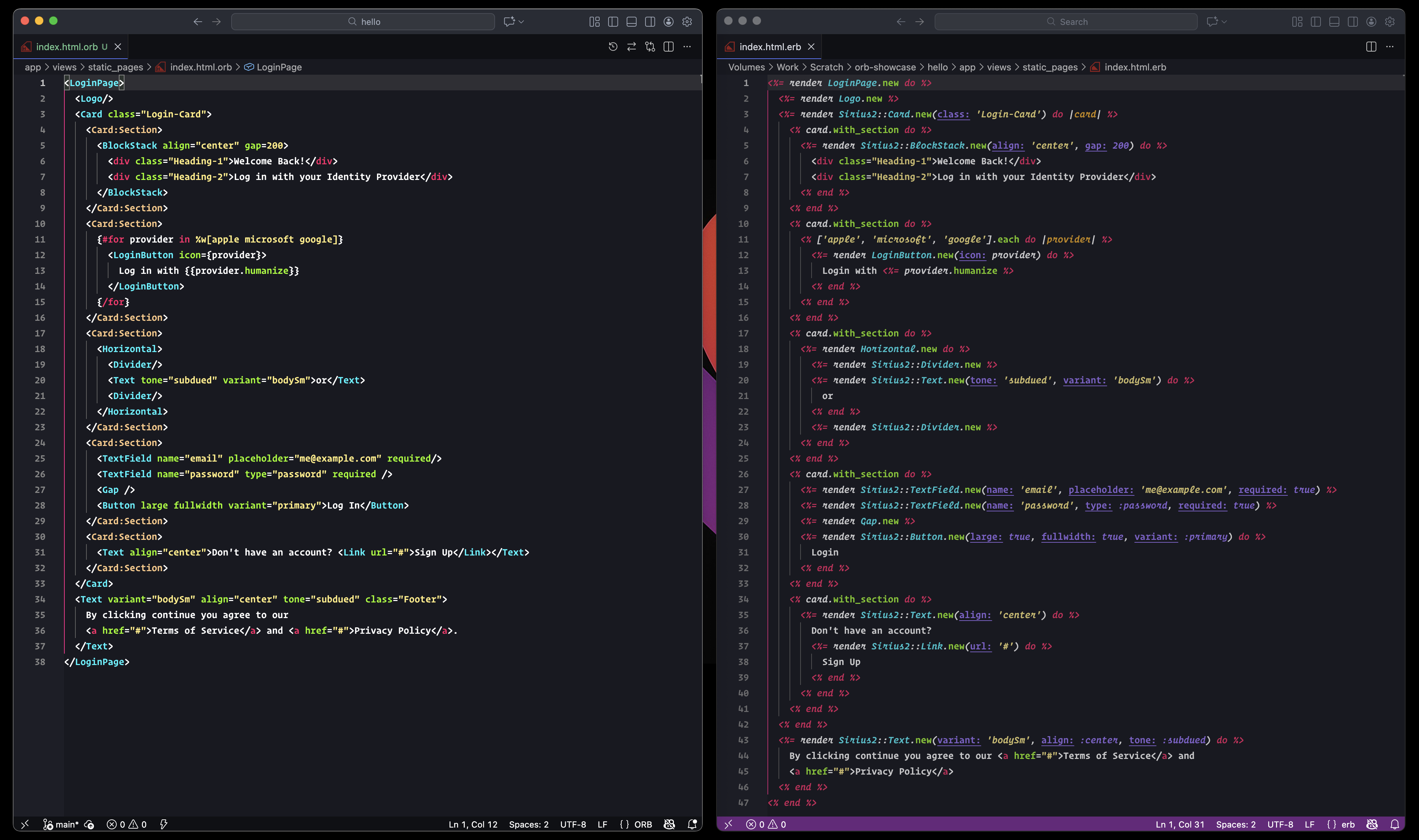
A comparison of the syntax of ORB view templates and ERB view templates
Take a look at the comparison between ERB and ORB templates above. The advantages are visible immediately:
- Readability: The structure of your markup remains intact. You can fold tags, highlight syntax, and navigate the DOM tree in your editor without getting tripped up by Ruby delimiters.
- Refactoring: Moving a component from one part of the page to another is as simple as cutting and pasting a tag. No more hunting for the dangling
endtags that you might have missed.
Working in ORB feels less like hacking a text file and more like crafting a user interface.
A Bridge for the JavaScript Generation
Hiring front-end talent can be tricky these days. Especially so if you are not on the React/Vue tech-stack. There is a whole generation of brilliant developers who "grew up" on JSX syntax. Throwing them into a codebase full of Ruby templates can feel like stepping back in time to a place where real engineers would code on stone tablets and defend their creations by smacking dinosaurs over the head with the 6,000-page introduction to Borland-C.
ORB speaks their language and offers an almost seamless transition between the two worlds.
By treating ViewComponents as native-feeling tags (e.g., <UserCard user={@user} />), ORB bridges the mental gap between the frontend ecosystem and Rails.
- Familiarity: A React developer looks at an ORB template and immediately understands the component hierarchy.
- Lower Cognitive Load: They don't need to learn the intricacies of Ruby block syntax just to render a button.
- Unified Mental Model: It allows your team to share a common design language ("Just use the
<Alert />component") regardless of whether they are writing Ruby or JavaScript.
Designers, UI Frameworks, and the "Copy-Paste" Workflow
In modern web development, we rely heavily on UI kits - think ShadCN, Bulma, or Tailwind UI. These libraries provide beautiful, pre-built HTML snippets ready to drop into your markup.
In a traditional ERB workflow, converting a massive block of Tailwind HTML into Rails templates is a chore. You have to carefully inject Ruby tags, break apart the HTML, and ensure you don't break the layout.
With ORB, interactions with designers and UI kits become much more seamless.
- HTML First: Since ORB is a superset of HTML, you can often paste a snippet from a UI kit directly into your file, and it just works.
- Progressive Enhancement: You can take a static HTML prototype from a designer and sprinkle in dynamic behavior without rewriting the markup structure.
- Components use: Designers can leverage your existing design systems and view components libraries for crafting new interactions, without requiring a two-way translation from ERB to Designer and from Designer back into ERB.
It makes the "handoff" from design to engineering significantly less painful when everyone "speaks" the same language.
Banishing the Boilerplate
One of the things we love about frameworks like Vue and Svelte is the succinctness of their control flow. Why write five lines of code when one will do?
ORB introduces convenience directives like :if= and :for= that drastically reduce the noise in your views.
The Old Way (ERB):
<% if @user.admin? %>
  <div class="admin-panel">
    <%= render AdminControls.new %>
  </div>
<% end %>
That’s a lot of syntax characters just to toggle a div.
The ORB Way:
<div class="admin-panel" :if={@user.admin?}>
  <AdminControls />
</div>
The difference becomes even more stark with loops. Instead of wrapping your list items in a Ruby block, you simply tell the element to repeat itself:
<ItemCard item={item} :for={item in @items} />
This isn't just about saving keystrokes; it's about scanning. When you scan the file, you see the HTML structure first. The logic is an attribute of the UI, not a block that interrupts the UI. It makes your templates cleaner, more readable, and honestly, a lot more fun to write.
Give it a Spin
We built ORB Template because we wanted the developer experience of a Single Page Application (SPA) without the complexity of a SPA. We wanted our Rails views to feel modern, tooling-friendly, and accessible to everyone on our team.
If you’re ready to clean up your view layer, check out the repo on GitHub and let us know what you think.
Happy coding!